


**Windows 11 Is Bringing Back Calendar Agendas—But With a WebView2 Twist**
Windows 11’s next update will reintroduce support for Calendar Agendas in the Notification Center—a feature many users missed after it was removed following Windows 10’s retirement in 2021. However, while the Outlook-based Agenda view is making a comeback, it’s taking on a new form as a WebView2 component. In essence, this means the feature is powered by a web wrapper that calls Edge resources in the background.
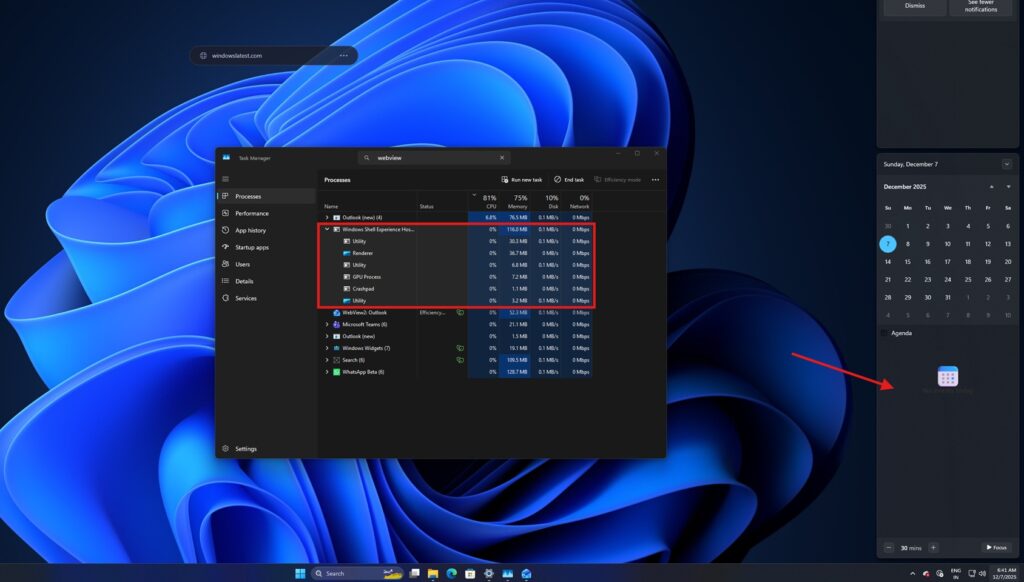
Currently, Microsoft is still testing Agenda view in Windows 11 preview builds, and many users—including myself—are experiencing incomplete functionality. When I enabled the Agenda view and opened the Notification Center, I noticed a significant spike in WebView2 processes. In a video I recorded, the “Windows Shell Experience Host” process in Task Manager jumps from idle to using over 15% CPU as soon as the Agenda renders. Expanding this process reveals multiple WebView2 sub-processes, such as “GPU Process,” “Renderer,” and “Utility”—all standard components found in Microsoft Edge’s WebView2 architecture.
When you interact with Notification Center, these processes wake instantly, and the memory usage jumps from around 1MB to over 130MB as the Agenda view loads. When you close the Notification Center, Windows attempts to save resources and power by putting these components back to sleep. For example, “GPU Process” and “Utility” processes switch immediately to a “Suspended” state, essentially freezing them so they stop using CPU and RAM.
Despite its resource management, many users remain unconvinced about WebView2’s approach. Web apps—especially those using WebView2 or Electron—often lack the native feel on Windows 11. In contrast, frameworks like React render native UI components (for example, TextView on Android), delivering smoother performance and appearance—especially on mobile.
**Is Agenda View in Windows 11 As Good As Windows 10?**
Functionally, the new Agenda view in Windows 11 is reminiscent of its Windows 10 predecessor: clean, straightforward, and offering a chronological overview of your scheduled meetings. But there are key new additions. Notably, you’ll encounter AI-powered features; clicking on an agenda entry grants access to ‘Microsoft 365 Copilot.’
Microsoft has confirmed the integration of MS365 Copilot into the Calendar Agenda view within Notification Center. Fortunately, the AI component is optional—you can simply ignore it if you prefer. Another useful addition lets you join Teams meetings directly from the Agenda view.
From a user perspective, many won’t mind as long as the Agenda view performs reliably—and, in its current state, it seems to deliver without excessive resource use. Microsoft will likely continue optimizing WebView2’s performance in the Notification Center. However, it’s worth questioning if the switch to WebView2 was necessary, given that other WebView2-based apps like Teams, WhatsApp, and Discord have become notorious for high resource consumption on Windows 11.
**What Do You Think?**
Are you excited about the return of Calendar Agenda in Windows 11, or concerned about the growing reliance on web-based components? Share your thoughts in the comments below!
https://www.windowslatest.com/2025/12/07/windows-11s-agenda-view-in-the-notification-center-is-a-webview2-web-app-component-not-native/